
How to Stop Two Sales Reps Messaging the Same Prospect on LinkedIn
Two reps, one prospect, two messages in the same week. Here is why it keeps happening on LinkedIn and the three rules that stop it: one owner, an ownership window, and a same-day check.
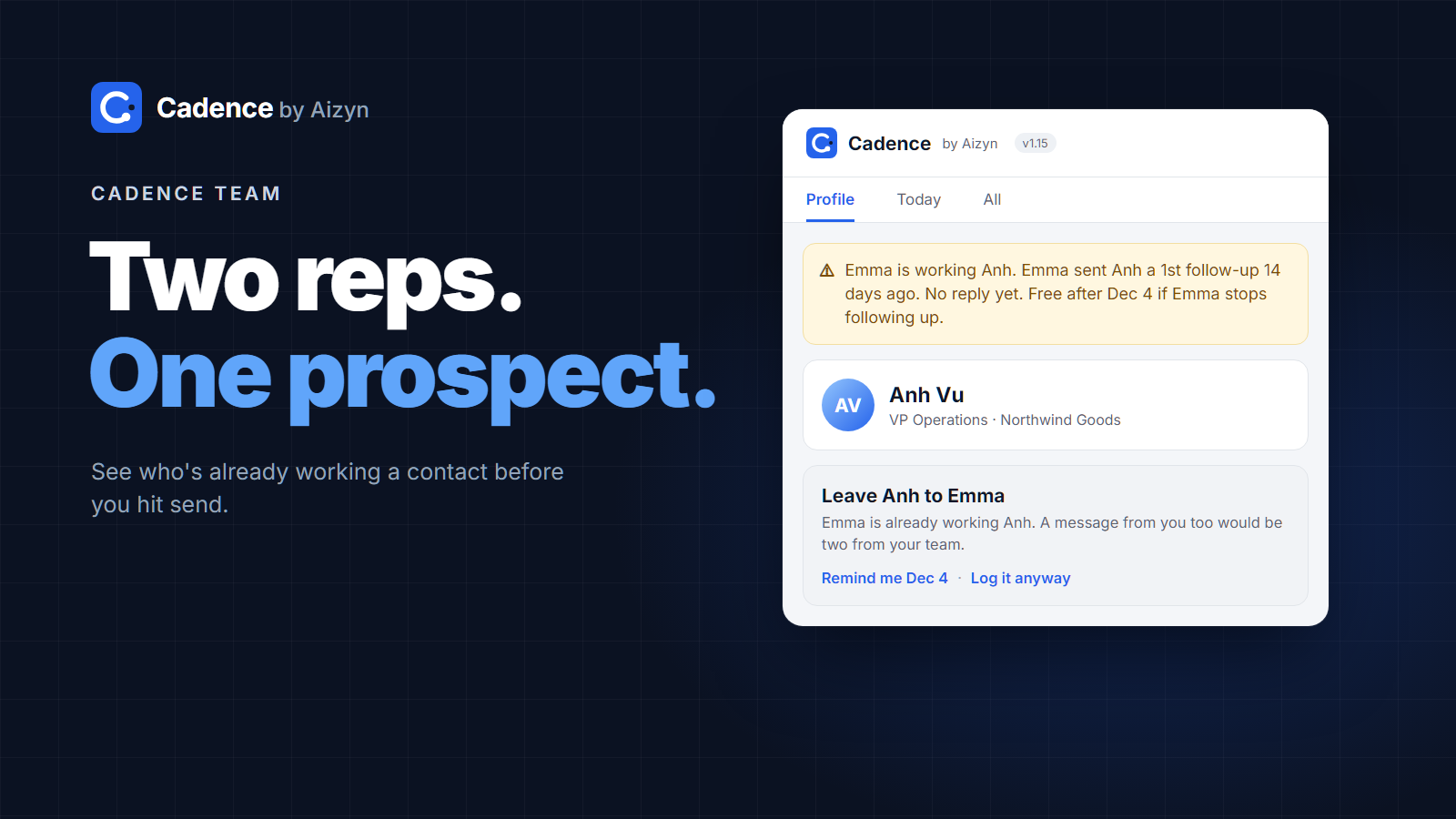
To stop two reps messaging the same prospect on LinkedIn, every contact needs one owner, that ownership needs an end date, and every rep needs to see who is working someone before they hit send. A shared spreadsheet cannot do the last part, because nobody checks it in the moment that matters. This post covers the three rules and how to make them automatic.
Why it keeps happening
On a sales team, LinkedIn outreach happens in personal accounts. Each rep has their own inbox, their own connections, and their own memory of who they talked to last week.
So the overlap is invisible. Your SDR invites the VP of Operations on Monday. Your AE, who met her at a conference two years ago, sends a friendly note on Wednesday. Your founder comments on her post on Thursday.
From her side, it does not look like three people. It looks like one company that does not talk to itself.
What it costs you
Credibility. Two messages with two different pitches tell the prospect your team is disorganized before you have said anything useful.
The reply you already had. If she was mid-conversation with one rep, a cold note from another can end it.
Invites. LinkedIn limits how many connection requests you can send each week. Two reps inviting the same person spend two of them on one prospect.
Team trust. Reps start arguing over who found the lead first, and managers end up refereeing instead of coaching.
Rule 1: every contact has one owner
The simplest rule works best. Whoever contacts a person first owns them. Not whoever added them to a list, not whoever is most senior. The first real touch: an invite, a first message, a follow-up.
It is easy to explain, easy to check, and it rewards reps for acting, not for hoarding names.
Rule 2: ownership ends
Ownership without an end date turns into a land grab. A rep sends one message in March, never follows up, and the prospect is off limits forever.
Give ownership a window, such as 30 days from the first touch. If the owner keeps following up, they keep the contact. If they go quiet for longer than the window, the contact is open again for anyone on the team.
This rewards the behavior you actually want: consistent follow-up. If you need a refresher on what good follow-up looks like, see how to follow up on LinkedIn after no response.
Rule 3: check before you send, not after
Most teams agree on rules 1 and 2 and still collide, because the check happens in the wrong place.
A shared spreadsheet or CRM field only works if every rep opens it before every message and updates it after. In practice nobody does, because the moment of sending happens inside LinkedIn, not inside the sheet.
The check has to show up where the rep already is: on the LinkedIn profile, before they write. Something like:
"Emma is working Anh. 1st follow-up 14 days ago. No reply yet. Free after Dec 4 if Emma stops following up."
Add a same-day guard on top. If anyone on the team messaged a person today, everyone else should know, even if ownership has expired.
What about a shared spreadsheet?
A sheet with a "claimed by" column is better than nothing for a team of two. It breaks down quickly because:
It depends on every rep updating it after every message
It is out of date the moment someone forgets
It does not warn you; you have to remember to look
It has no idea when ownership should expire
The fix is not a better spreadsheet. It is logging that happens as reps work, and a warning that appears on its own.
How to make it automatic with Cadence Team
Cadence is a free Chrome extension that logs your LinkedIn invites and messages as you send them and reminds you who is due for a follow-up. It never sends or automates anything. (Here is how to set it up in four steps.)
Cadence Team connects your reps' Cadence so the three rules run on their own:
One owner: the first rep to touch a contact owns them.
Ownership ends: after 30 days without a follow-up, the contact opens up. You can change the window.
Warned before you send: open a profile and Cadence shows who is working them, their last step and when the contact is free. It suggests leaving them to your teammate and can remind you on the day they open up.
Same-day guard: if a teammate already messaged someone today, everyone sees it.
Reps never log in. You invite them by email, they click Join, and their Cadence connects. Only who, which step and when are shared. Message text and notes stay private.
Cadence Team is $25 a month for up to 5 seats, plus $5 per extra seat. Get early access.
FAQ
How do you stop sales reps contacting the same prospect?
Give every contact one owner (the first rep to touch them), let ownership expire after a set window such as 30 days, and show reps who is working a contact before they message. The last part only works if the check appears where reps send messages.
Who should own a lead when two reps find it?
The rep who made the first real touch, such as an invite or a first message. It is the easiest rule to check and it rewards action.
How long should lead ownership last?
Long enough to run a full follow-up sequence. 30 days from the first touch is a good default, extended while the owner keeps following up.
Can a CRM prevent duplicate LinkedIn outreach?
Only if reps log every LinkedIn message in it and check it before sending. Most do not, because LinkedIn messages happen outside the CRM. A tool that logs from inside LinkedIn closes that gap.
Does Cadence Team share my messages?
No. It shares who you contacted, which step and the date. Message text and notes are never shared.