
How to Follow Up on LinkedIn After No Response (With a 5-Step Cadence)
Wait 3 to 7 days, add something new each time, and stop after five follow-ups. Here is the full LinkedIn follow-up cadence with an example message for every step.
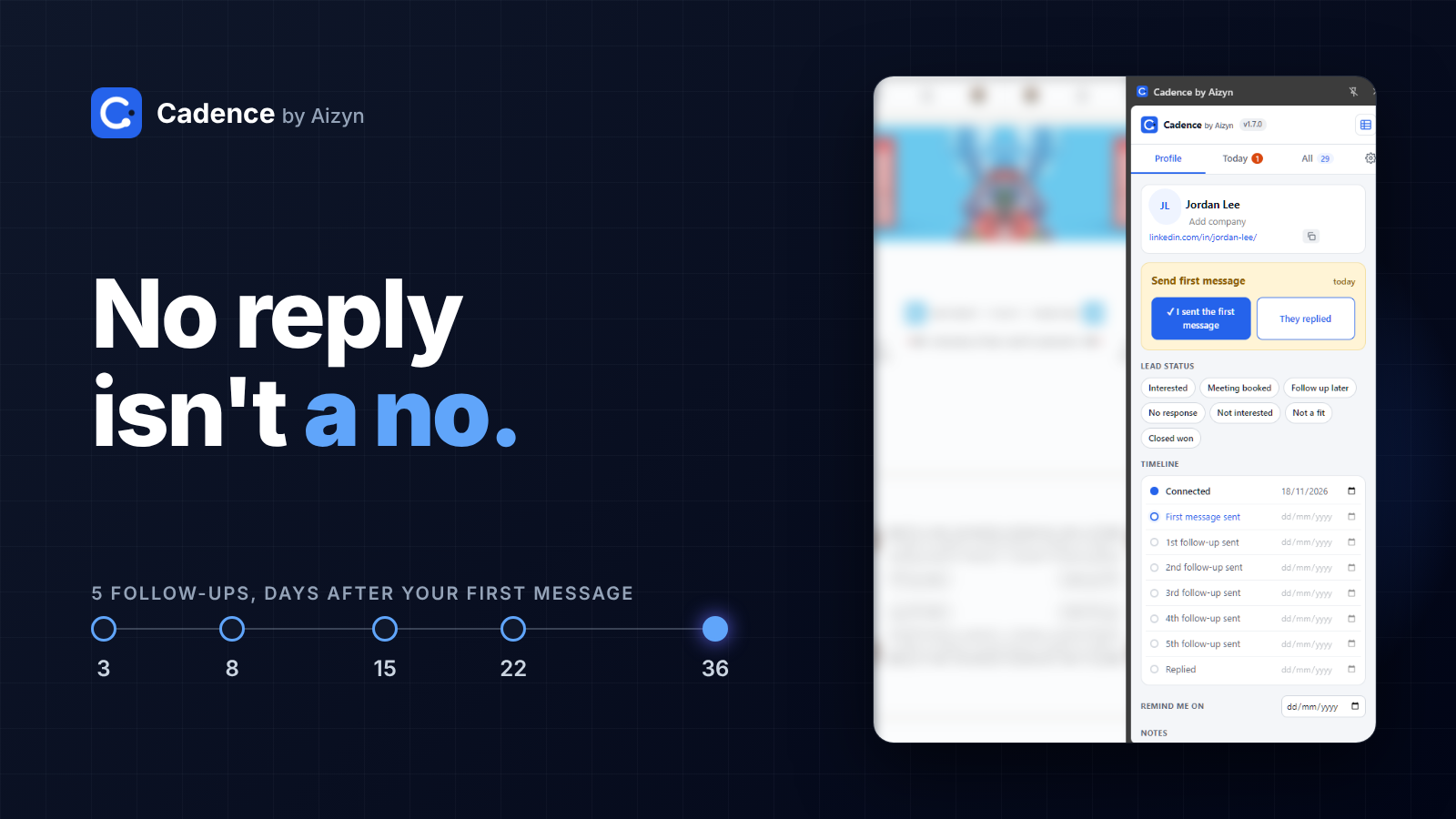
Wait 3 to 7 days before your first LinkedIn follow-up, and make every follow-up add something new instead of repeating the first message. Send up to five follow-ups spaced further apart each time, then stop. This post gives you the exact cadence, one example message per step, and a way to never forget the next one.
Why most LinkedIn conversations die after one message
Most conversations do not end with a no. They end with silence.
You send a message. A day passes. You get busy. A week later the thread is buried under 40 newer ones, and you never write back.
That is not a messaging problem. It is a memory problem. The person was never rejecting you. You just stopped.
There is a second reason people stop: fear. Automation tools promise to fix the memory problem by sending follow-ups for you, and many people worry about what that does to their account. A manual-first approach avoids that trade. You write and send every message yourself. You only need a system that tells you who to follow up with, and when.
The 5-step LinkedIn follow-up cadence
Count the days from your last message, not from the first one. Each gap is longer than the one before, so you stay present without becoming a nag. This is a working sample, not a law. Adjust it to your market.
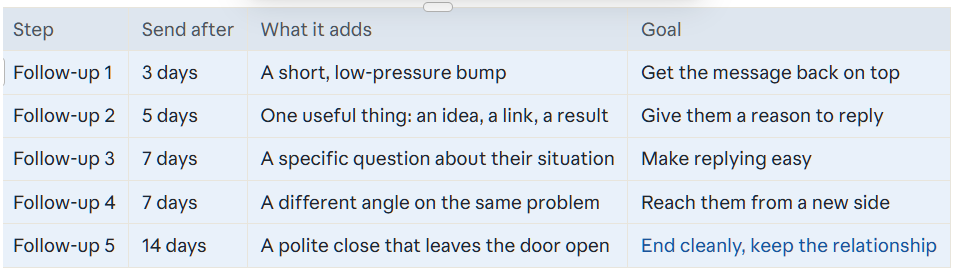
That is about five weeks from your first message to your last. The first follow-up is the only one inside the 3 to 7 day window from the answer above. After that, the gaps stretch on purpose.
The rule behind the table: every message adds something. If a follow-up only says "just checking in", it adds nothing, and it teaches the other person to ignore you.
One example message for each step
These assume your first message asked a simple question about a problem they likely have. Swap the brackets for real details.
Follow-up 1 (day 3): the light bump
Hi [Name], floating my last message back up in case it got buried. No rush. Is [problem] something you're dealing with right now?
Follow-up 2 (day 8): add something useful
[Name], I ran into this today and thought of you: [short idea, link, or result relevant to their work]. Might be useful for [specific thing they do].
Follow-up 3 (day 15): a specific question
Quick question, [Name]. When [situation], how does your team usually handle it? Asking because [honest reason you ask].
Follow-up 4 (day 22): a new angle
Looking at this a different way: most [role]s I talk to worry about [problem A], but the bigger cost is usually [problem B]. Does that match what you see at [Company]?
Follow-up 5 (day 36): the graceful close
[Name], I'll stop filling your inbox. If [problem] becomes a priority, I'm easy to find. Either way, I'm following your work on [topic] and enjoying it.
Notice what is missing. No "just checking in". No "did you see my last message?". No guilt.
When to stop following up
Stop after the fifth follow-up. Stop sooner if any of these happen:
They say no, or ask you to stop. Thank them and close the thread.
They reply, even with a short answer. A reply resets the clock and starts a real conversation.
They move to a new role or company. Treat that as a fresh start, with a new first message.
Stopping is not giving up. A clean close protects the relationship, and people remember who was polite when they were not ready.
How to run this cadence without remembering it
The cadence only works if you follow it. A spreadsheet works until you stop opening it. Your memory works until you have 40 open conversations.
Cadence is a free Chrome extension for LinkedIn follow-ups. It is manual-first: you write and send every message yourself, and Cadence reminds you on the right day. Your list of who is due today is the only thing you need to check each morning.
It will not message anyone for you, and that is the point. Your account stays in your hands, and every message still sounds like you.
FAQ
How long should I wait before following up on LinkedIn?
Wait 3 to 7 days for the first follow-up. Three days works for a warm lead who already knows you. Seven days is safer for a cold first message.
How many times should I follow up on LinkedIn?
Up to five follow-ups over about five weeks, then stop. Past that, you add pressure and no value.
What should I say in a LinkedIn follow-up?
Add something new every time: a useful idea, a specific question, or a different angle. Avoid "just checking in", which adds nothing.
Is it okay to follow up if someone read my message but did not reply?
Yes. A read receipt is not a no. People read messages and forget to answer. Follow up on schedule and keep it light.
Do I need automation to follow up consistently?
No. You need a reminder, not a robot. A manual-first system tells you who is due and when, and you send each message yourself.